FlameAI — Foundation Series

내 컴퓨터에서 실행되는 나의 AI
API로 연결되는 나의 AI

내 PC 또는 내 서버에서 AI 모델을 실행하는 설치 구동형 AI입니다.
복잡한 서버 구성 없이 시작하고, 방화벽이나 네트워크 설정 조작 없이
REST API를 통해 내 AI를 호출할 수 있습니다.

FlameAI — 연결 방식
Your App
클라이언트 / 서비스
API Gate
api-xxxx.flameai.im
/v1/{endpointId}
My FlameBox
내 PC / 서버
Gemma 4b
QWEN
Llama 3

사용 방법

3단계로 바로 시작

CortexBox 설치부터 외부 API 호출까지 5분이면 충분합니다.

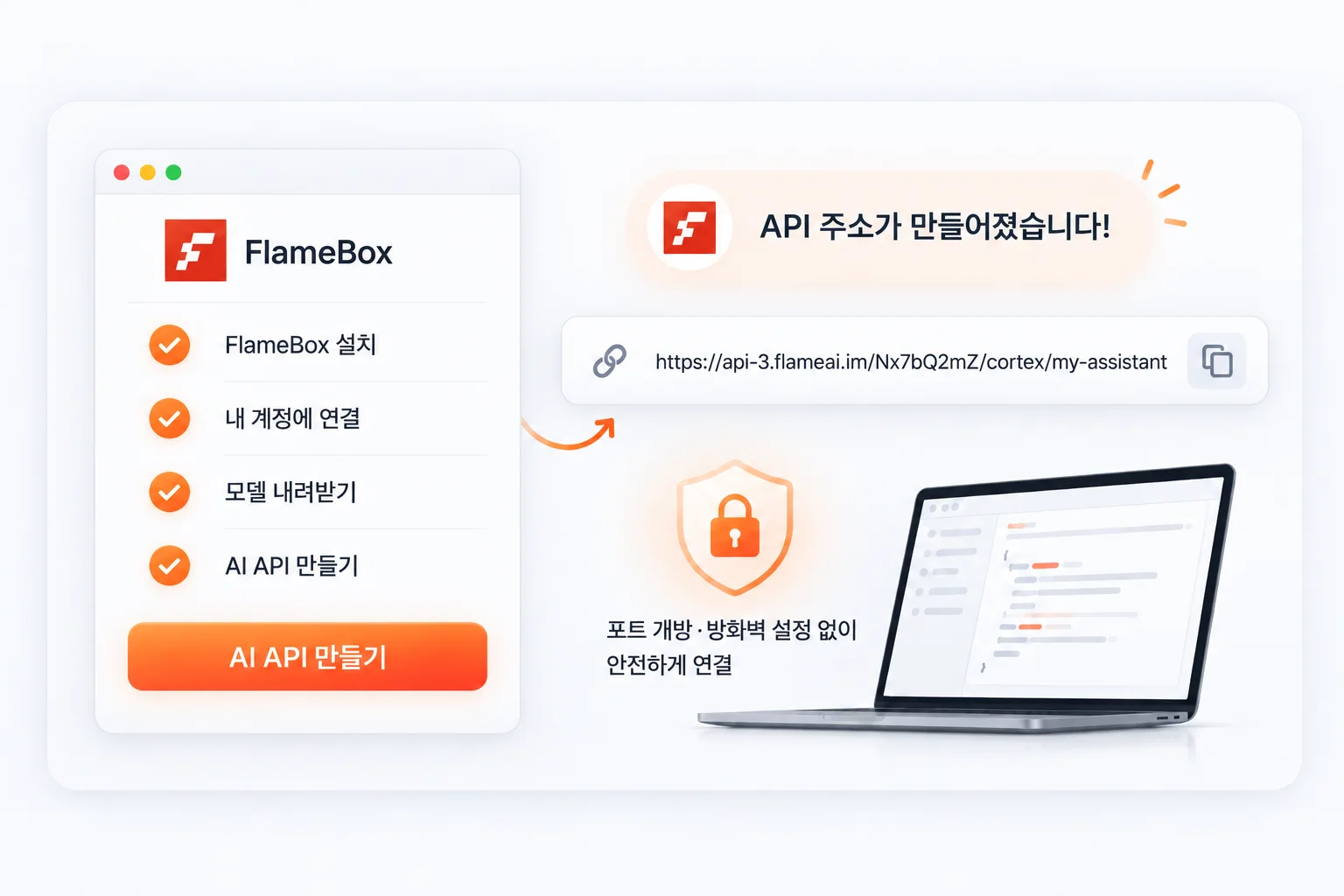
1
CortexBox 설치

Windows 또는 Linux 서버에 CortexBox를 다운로드하여 압축 해제합니다. 별도 런타임이나 설치 프로그램이 필요 없습니다.

2
LLM 모델 로드

GGUF 형식의 오픈소스 모델을 지정하면 즉시 로컬 추론 환경이 구축됩니다. Llama 3, Mistral, Gemma 2 등을 지원합니다.

3
API 연결 & 호출

Cortexable 계정을 연결하면 외부 API 엔드포인트가 발급됩니다. Bearer Token으로 어디서든 바로 호출할 수 있습니다.

주요 기능

Cortexable이 다른 이유

클라우드 LLM의 편의성과 로컬 추론의 보안성을 동시에 제공합니다.

🔒
데이터 완전 로컬

프롬프트와 응답이 내 서버 밖으로 나가지 않습니다. 민감한 데이터를 외부 LLM 서비스에 전송할 필요가 없습니다.

💸
토큰 과금 없음

클라우드 LLM처럼 토큰당 비용이 발생하지 않습니다. 하드웨어 비용만으로 원하는 만큼 사용할 수 있습니다.

🌐
외부 API 노출

Cortexable Export 기능으로 로컬 LLM을 외부 API로 즉시 공개합니다. SSH Stream으로 안전하게 터널링됩니다.

📦
다양한 모델 지원

Llama 3, Mistral 7B, Gemma 2, Phi-3 등 GGUF 형식 모델을 지원합니다. 모델 목록 →

로컬 전용 모드

Cortexable 연결 없이 순수 로컬 LLM 서버로 사용할 수 있습니다. 오프라인 환경에서도 완전히 동작합니다.

💬
Stateful 대화 관리

{chatId} 기반으로 대화 이력을 서버에서 관리합니다. 매 요청마다 전체 이력을 재전송할 필요가 없어 페이로드가 가볍습니다.

API 미리보기

기존 코드에 바로 붙여 쓰세요

Bearer Token 하나면 어디서든 내 로컬 LLM을 호출할 수 있습니다. 클라우드 LLM API와 동일한 방식으로 교체 가능합니다.
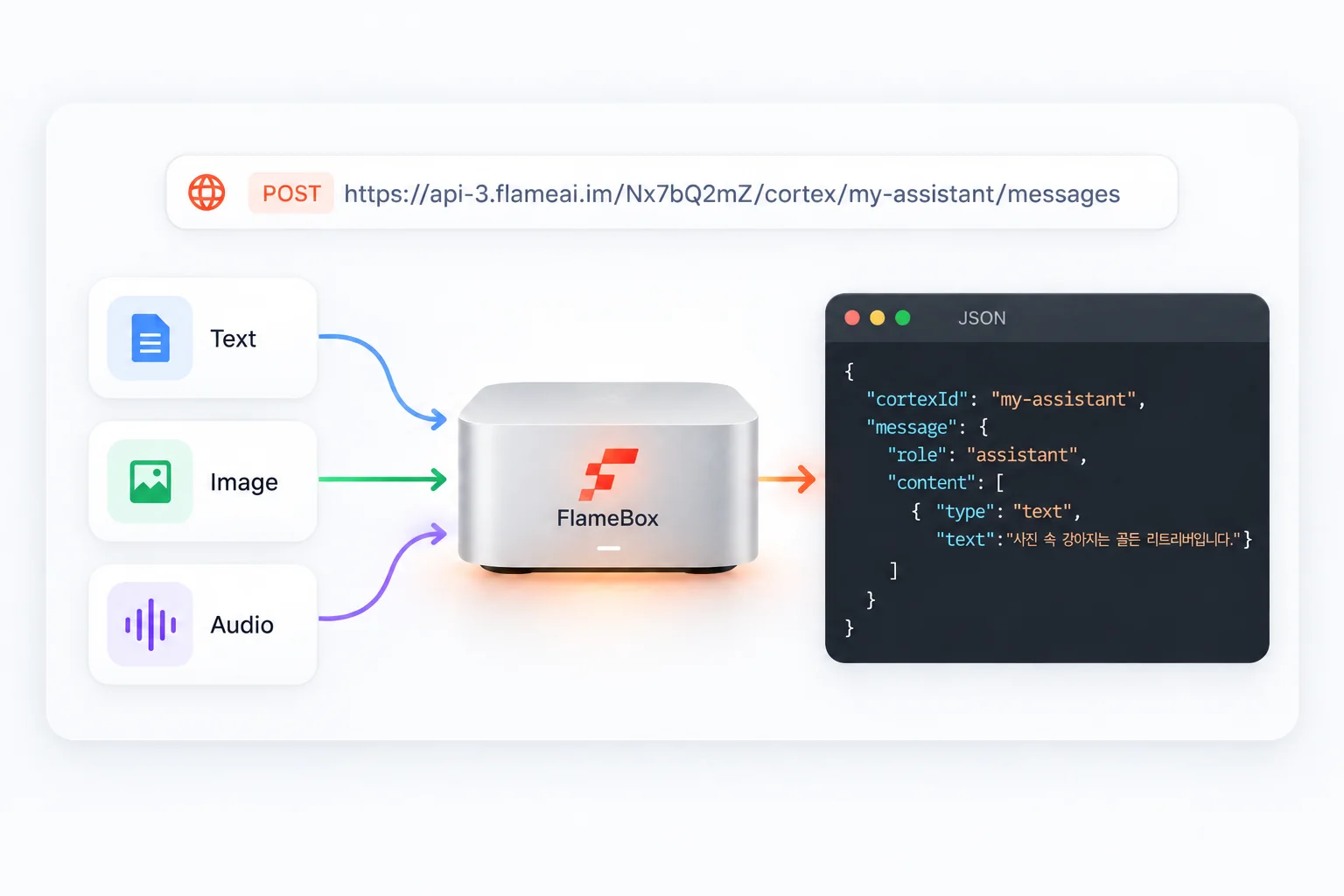
{chatId}로 대화 세션을 식별하며, 이력은 서버에서 관리됩니다 — 매 요청마다 전체 컨텍스트를 재전송할 필요가 없습니다.

# POST — 메시지 전송 POST https://api-xxxxx.cortexable.com/v1/{chatId}/message Authorization: Bearer <your-token> Content-Type: application/json { "model": "llama3-8b", "message": "안녕하세요!", "stream": true } # 응답 (SSE 스트리밍) data: {"token": "안녕", "done": false} data: {"token": "하세요!", "done": false} data: {"token": "", "done": true}
# curl — 바로 실행해보기 (단답) curl -X POST \ https://api-xxxxx.cortexable.com/v1/{chatId}/message \ -H "Authorization: Bearer <your-token>" \ -H "Content-Type: application/json" \ -d '{"model":"llama3-8b","message":"안녕하세요!","stream":false}' # curl — SSE 스트리밍 수신 curl -X POST \ https://api-xxxxx.cortexable.com/v1/{chatId}/message \ -H "Authorization: Bearer <your-token>" \ -H "Content-Type: application/json" \ -H "Accept: text/event-stream" \ -d '{"model":"llama3-8b","message":"안녕하세요!","stream":true}' \ --no-buffer
import requests url = "https://api-xxxxx.cortexable.com/v1/{chatId}/message" headers = { "Authorization": "Bearer <your-token>", "Content-Type": "application/json" } payload = { "model": "llama3-8b", "message": "안녕하세요!", "stream": False } res = requests.post(url, headers=headers, json=payload) print(res.json())
// fetch API — 브라우저 · Node.js 18+ const res = await fetch( "https://api-xxxxx.cortexable.com/v1/{chatId}/message", { method: "POST", headers: { "Authorization": "Bearer <your-token>", "Content-Type": "application/json" }, body: JSON.stringify({ model: "llama3-8b", message: "안녕하세요!", stream: false }) } ); const data = await res.json(); console.log(data);
// Java 11+ HttpClient import java.net.http.*; import java.net.URI; var client = HttpClient.newHttpClient(); var body = """ {"model":"llama3-8b","message":"안녕하세요!","stream":false}"""; var request = HttpRequest.newBuilder() .uri(URI.create( "https://api-xxxxx.cortexable.com/v1/{chatId}/message")) .header("Authorization", "Bearer <your-token>") .header("Content-Type", "application/json") .POST(HttpRequest.BodyPublishers.ofString(body)) .build(); HttpResponse<String> response = client.send( request, HttpResponse.BodyHandlers.ofString()); System.out.println(response.body());
package main import ( "bytes" "encoding/json" "fmt" "net/http" ) func main() { payload, _ := json.Marshal(map[string]any{ "model": "llama3-8b", "message": "안녕하세요!", "stream": false, }) req, _ := http.NewRequest("POST", "https://api-xxxxx.cortexable.com/v1/{chatId}/message", bytes.NewBuffer(payload)) req.Header.Set("Authorization", "Bearer <your-token>") req.Header.Set("Content-Type", "application/json") resp, _ := (&http.Client{}).Do(req) defer resp.Body.Close() fmt.Println(resp.Status) }
// .NET 6+ using System.Net.Http; using System.Net.Http.Json; using var client = new HttpClient(); client.DefaultRequestHeaders.Add( "Authorization", "Bearer <your-token>"); var res = await client.PostAsJsonAsync( "https://api-xxxxx.cortexable.com/v1/{chatId}/message", new { model = "llama3-8b", message = "안녕하세요!", stream = false }); Console.WriteLine(await res.Content.ReadAsStringAsync());

CortexBox

Cortexable의 로컬 실행 엔진

CortexBox는 Cortexable 플랫폼의 로컬 LLM 런타임입니다. 내 Windows PC 또는 Linux 서버에 설치하면 즉시 로컬 추론 환경이 구축되고, Cortexable과 연결해 외부 API로 공개할 수 있습니다.

로컬 전용 또는 Cortexable Export 모두 지원
GGUF 형식 오픈소스 모델 호환
GPU / CPU 환경 모두 지원
CortexBox v0.9.1 최신
Windows 42 MB
Linux 38 MB
출시일 2025-06-01

지금 바로 시작하세요

CortexBox를 설치하고 내 서버에서 LLM을 실행해보세요.
Cortexable 계정 없이도 로컬 전용으로 바로 사용할 수 있습니다.